Activate Theme License
Every purchase of Gomax includes a license tied to your Envato purchase code. This article shows you how to find that code and activate it in the theme dashboard, and how to deactivate it if you need to move your license to another site.
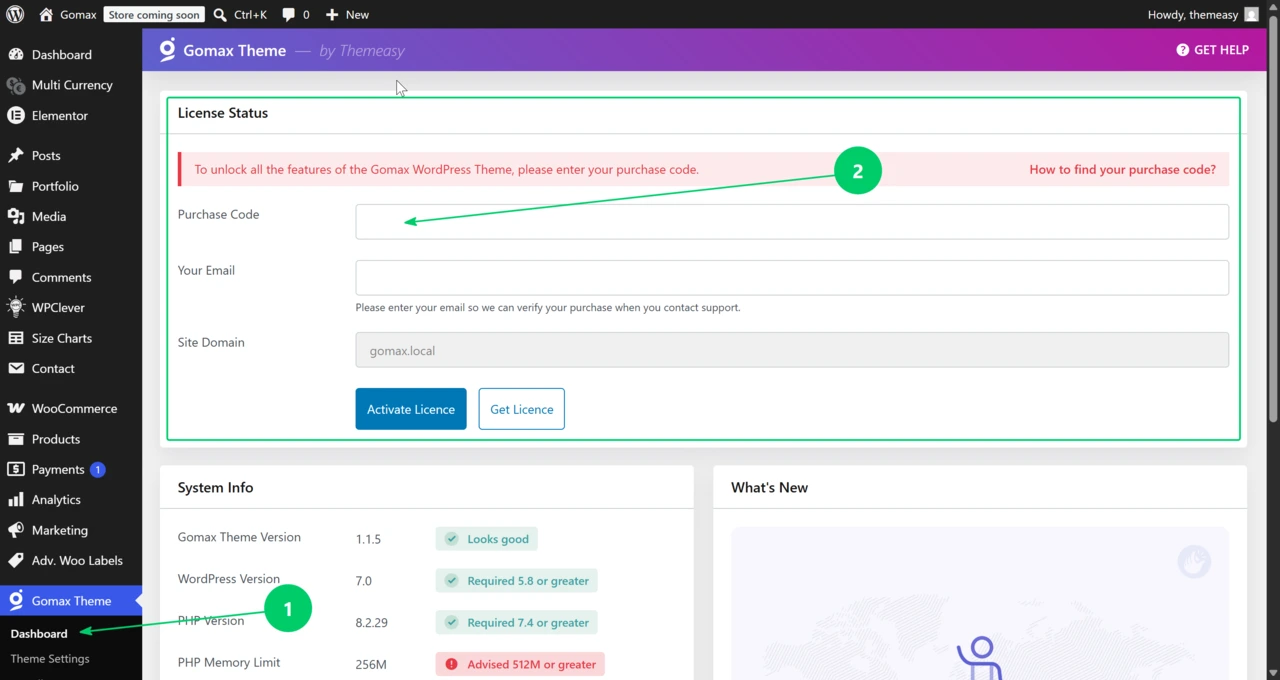
Activate the license with your purchase code
Section titled “Activate the license with your purchase code”The license system confirms that your copy of the theme is genuine and gives you direct access to support. Activate it as soon as you install the theme.
- Find your purchase code by following Envato’s guide: Where Is My Purchase Code?
- In your WordPress admin, go to Gomax » Dashboard.
- Paste the code into the Purchase Code field.
- Click Activate License to save.
Deactivate the license
Section titled “Deactivate the license”Activate the license on your local or staging environment while you build the site — some features only work with an active license. Once the site is live, deactivate the license on staging so you can reuse the same purchase code on your production site.
- In your WordPress admin, go to Gomax » Dashboard.
- Click Deactivate License to save.
If you’re working in a local environment, the theme detects this automatically, so you can still use your purchase code normally once you move the site to production. Contact support if you run into any issues.
For the next steps after activation, see Import Demo Data or Required Plugins.