Global Sections: How to add, edit and choose conditions
Global Sections let you build a piece of content once — a header, footer, popup, or notice — and control exactly where it shows up across your site. This guide covers creating one, setting its display conditions, and editing its content with Elementor.
What is a Global Section?
Section titled “What is a Global Section?”A Global Section is a block displayed throughout the site, as opposed to content that belongs to a single page. A navbar or footer are typical examples, since they need to appear on every page.
Gomax adds a Global Sections feature that treats each section conditionally: you create a section once, then choose where it should — and shouldn’t — display. This is useful whenever a specific page needs a different navbar, or you want a popup or notification to appear only in certain places. You can customize the content of any Global Section with Elementor, using any widget, the same way you would build a regular page.
If you imported the demo data, several ready-made Global Sections are already available in the list. You only need to adjust where they display and customize their content.
Add or edit a Global Section
Section titled “Add or edit a Global Section”- From the WordPress dashboard, go to Gomax » Global Sections.
- Click Add New to create a section, or click Edit next to an existing one in the list.
- Give the section a title. This is only for organizing the list — it isn’t shown on the site.
- Set the display conditions in the Global Section settings:
- Section Type — the type of section you’re adding.
- Display Rules — the locations where this section should appear.
- Exclude Rules — the locations where this section should be hidden.
- Click Update to save your changes.
Editing settings and building content are two separate actions in the list: click Edit to adjust the section’s settings, and Edit with Elementor to build its content.
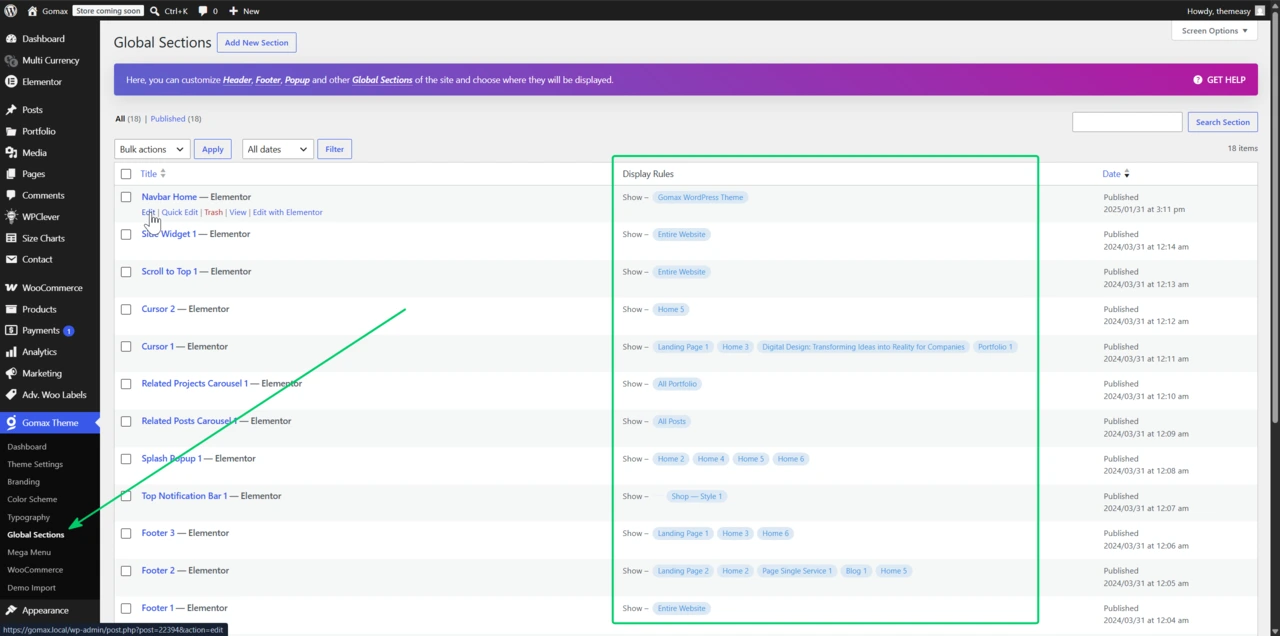
Customize a Global Section with Elementor
Section titled “Customize a Global Section with Elementor”- From the WordPress dashboard, go to Gomax » Global Sections.
- Find the section you want to customize and click Edit with Elementor.
- Build the content using Elementor widgets, the same way you would on a regular page.
You can delete any entry from the Global Sections list to stop it from displaying on your site — useful if you imported demo sections you don’t plan to use.