Creating Pages and Setting Your Homepage
Pages are the building blocks of your site — Home, About, Contact, Shop, and so on. This guide covers creating them and choosing which one visitors see first.
Create a new page
Section titled “Create a new page”From the WordPress dashboard, go to Pages » Add New and give the page a title. Then either:
- Click Edit with Elementor to design it visually with drag-and-drop, or
- Use the default WordPress editor for simple text content.
Click Publish when you’re done, and repeat for every page your site needs.
Set your homepage
Section titled “Set your homepage”By default, WordPress shows your latest posts on the front page. To display a designed page instead:
- Go to Settings » Reading.
- Under Your homepage displays, select A static page.
- Choose your designed page in the Homepage dropdown.
- (Optional) Pick a page for Posts page if you also keep a blog.
- Click Save Changes.
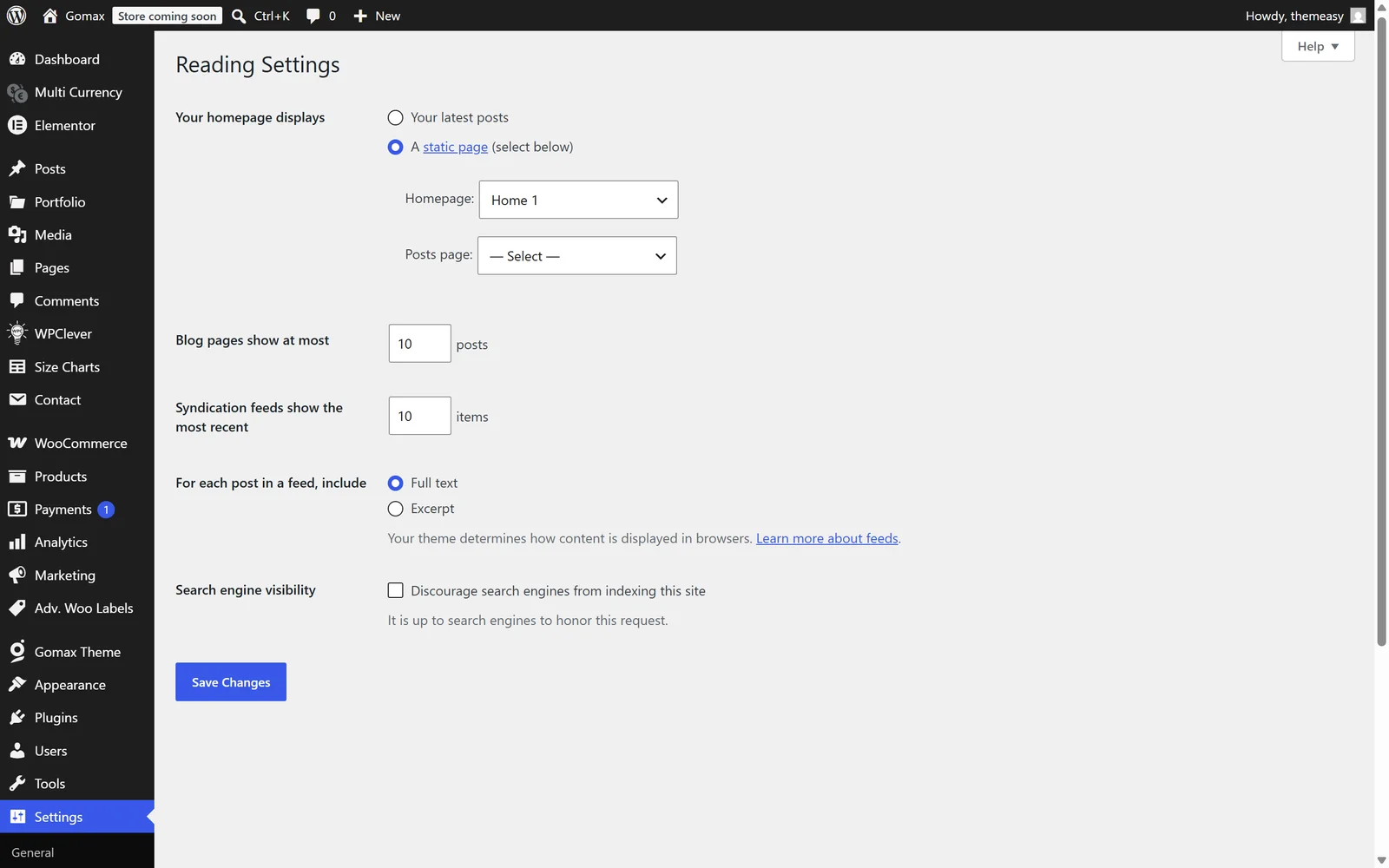
The page you selected is now the first thing visitors see.
Add pages to your menu
Section titled “Add pages to your menu”For visitors to reach your pages, add them to a navigation menu under Appearance » Menus — or build an advanced, multi-column menu with the Mega Menu.